Interactive Workspace Experience
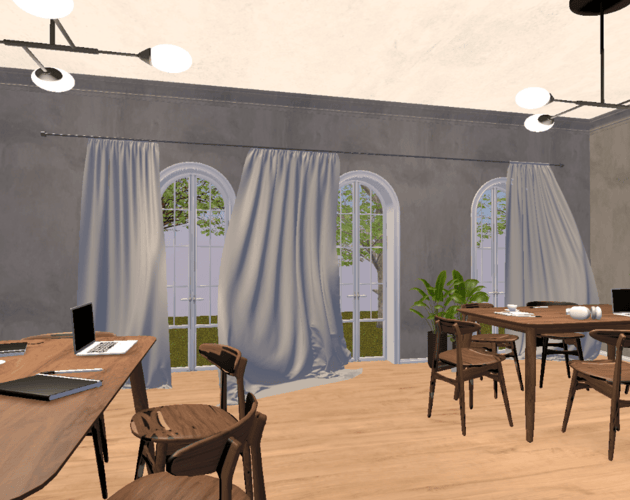
A Unity-based 3D environment recreating a realistic workspace setting. Originally created for the Interactive Systems (M110) course.
This project demonstrates simple first-person navigation, interactive objects, ambient sound, and lighting control.
WORKSPACE EXPERIENCE - CONTROLS
MOVE:
WASD / Arrows • LOOK: Mouse • CROUCH: C
INTERACT (E):
Light Switch • Notebook • Headphones
OTHER:
Left Click - Laptop • N - Day/Night Toggle
Press SPACE or ENTER to start
Try these features:
- Try moving closer to the notebook on the right desk and press (E) to view the note. Try left-clicking on the note’s panel so you can write your own!
- Try moving closer to the notebook on the left desk and press (E) to view the note. There is a question there for you! But even if you don't know the answer, you can always check the book in front of you. Come back and try to write your answer by left-clicking on the note’s panel!
- Try moving closer to the laptops, one on the right desk and one on the left desk. Try left-clicking on the screen of each laptop to open them and hear the typing sounds!
- Try moving closer to the headphones, one on the right desk and one on the left desk, press (E) and listen to some music! Right desk: arabic nasheed, Left desk: french song.
- Try moving closer to the windows and listen to the birds chirping… or, for the full nature experience, go outside!
- Try activating night mode by pressing (N) and go outside… look at the stars in the sky!
- Go near the light switch to turn off the lights by pressing (E). At the same time, try activating night mode by pressing (N). Scary, huh?
New Updates:
- Interactive Feedback: Now, when you approach an interactable item, small text hints will appear, helping you identify which objects can be interacted with.
- Invisible Boundaries: Invisible colliders have been added to prevent players from accidentally falling outside the workspace area.
- Fullscreen Improvement: The fullscreen feature on itch.io now works correctly, allowing the viewport to expand properly.
Stay tuned for the next version:
- Notebook Feedback: In the next version, when you write in the notebook on the left desk, you’ll get feedback to let you know if your answer is correct or incorrect!
- Night Mode Surprise: When you turn off the lights in night mode, be ready for a not-so-friendly surprise 👻!
- Headphone Playlist: The headphones will soon feature a playlist of different songs, adding even more variety to the audio experience!
Comments
Log in with itch.io to leave a comment.
Very nice environment! The atmosphere and the songs are excelent!! the sound on the laptop is nice too!
However, I could walk throught all the objects, like the table, plants, bookselves, etc. This took away the engagement!
Overall an amazing experience!
From the moment I stepped into the house, I really enjoyed the whole experience!
The interior is very beautiful, the wooden furniture and soft lighting look great, and the outdoor area with the trees is lovely too. I also really liked how the notes appear and that I can actually write inside them. Hearing the laptop typing when clicking the screens, listening to music through the headphones, and switching to night mode made the experience feel even more immersive. The overall sound design felt cozy and welcoming.
Just a tiny note from my playthrough, the welcome audio kept playing when I left the house. Other than that, everything felt smooth, charming, and really thoughtfully made.
Wonderful work!!!
Lovely space, warm yet expansive! The rich wood of the furniture, the tall windows, the plants--everything contributes to the crafting of an atmosphere well-suited not only for concentrating on work but perfect for relaxing during breaks as well. I especially liked the idea of leaving you a note and I also really enjoyed the music choice (esp the arabic song!).
Only note, I would love it if, instead of having the instructions on the game description, there was a dedicated UI for them that I could toggle while playing to check where I'm at (e.g. regarding interactive items--which have I forgotten to interact with?) or if the interactive items were otherwise indicated as such in-game (e.g. when in vicinity a prompt appears or they 'glow' etc.).
To conclude, wonderful work !!
Thank you for your feedback! I’m happy you enjoyed the atmosphere of the space and even the music choice! 😊
I’ll keep your suggestions in mind for the next release. I’m also thinking of adding a small backstory that connects the interactive items in a more natural way, so players understand why they’re interacting with each object. Along with that, I might include a simple instructions panel (menu) or light visual cues to make things clearer while exploring.
In the current version there’s only a small instruction hint when you reach the trigger zone of each item, but I agree that a more intuitive system would improve the experience!
The visual aspect and aesthetics of your project are exceptional. I really liked the detailed instructions at the beginning and the arrangement of the space. The sound of nature when standing near a window was also a great feature that enhanced the immersion of the environment.
Maybe it was just me, but I had difficulty interacting with the notebook and the second pair of headphones— in fact, I only managed to interact with them once. I would also love to see some visual indication for interactable items, perhaps an outline or a shine effect.
Great work, resulting in a great user experience! 👏🏼
Thank you for your feedback! I’m really glad you enjoyed the visuals and the nature sounds. 😊
Regarding the issues you mentioned with the notebook and headphones, it seems that you might have encountered them while I was testing out some recent changes. I ran into similar problems when I tested it myself, but I’ve since fixed everything.
I encourage you to try it again, everything should be working smoothly now. I also plan to continue improving things based on your input, and I hope the next experience will be even better!
Things I enjoyed: Excellent visual quality, which is hard to achieve for a small-sized web build. The night mode inside and outside of the house. The inputfield in the diary was inventive :)
Things I had difficulty with: The audio narration when you open the door has a slight bug - it stops abruptly. There is no feedback on which item is currently enabled, which makes it a bit hard to relate the audio response to the object trigger. There is no (visual) feedback on which interactable item is in range, which makes it hard to find out the interactables without looking at the instructions. Fullscreen button in itchio doesn't affect the game window, which is a shame, I would love to see it with larger viewport.
Ideas: Consider adding invisible boundaries (colliders) around the space to avoid play-testers falling down (as I did) :P Disabling camera controls during typing the memo note would be nice. Also, consider rendering the mouse pointer when looking at the laptop to assist users clicking on it.
Great work! 🌃 This visual approach had technical difficulties that were succesfully overcome. With some more UX refinements, this can become a good portfolio piece. Very well done for adding your GitHub repo.
Thank you so much for your feedback! 🌙 I’m really happy that you enjoyed the visual style and the night mode.
Based on your suggestions, I’ve made a few updates:
Regarding the notebook, I kept the mouse look and movement controls active intentionally. I wanted to allow players to move around the desk, view the notebook from different angles, and naturally close it by walking away.
Thank you again for taking the time to play and for your valuable suggestions, they were really helpful and encouraging!
New feature update:
Try moving closer to the notebook on the left desk and press (E) to view the note. It contains a question… I think you might already know the answer, but for anyone who doesn’t, there’s a book in front of them that can give a hint!